Social and chat apps
What each app does to your picture
When you post a picture, the app may cut part of it off, shrink it or save it with less detail. This page says what we found for 14 social and chat apps, and how we learned each fact, so you can tell what we measured from what we only read.
Start
How to read this page
Three plain words are used throughout.
- Shown whole means every edge of the picture was visible.
- Cut off means the app hid part of the picture. We say where, and how much stays, as a share of the width or the height.
- Padded means the app left empty space around the picture instead of cutting it.
Each fact is marked with how we learned it.
- Measured on a computer. We posted test pictures from one account and read what the app showed, on the date given. We used the app's website (for Signal, its desktop app). The 13 test pictures run from very wide (4:1) to very tall (1:3): 11 usual aspect ratios and those two extremes.
- Read from the app's help pages. The app's own help pages or a press report say so. We did not see it on a screen.
- Measurements ongoing. We have no figure yet, or only a partial one, and say so.
- Our reading, not tested. A sentence about what a cut or a narrow frame could mean for your picture. It is our reasoning, not a result.
Three limits apply to everything below. Each measurement is one account, one window and one day, and apps change how they draw a post without notice. Phone apps were not measured, and they can draw a picture differently from the website. Twelve of the 14 apps are measured. Measurements for Snapchat and YouTube are ongoing.
At a glance
| App | What we looked at | Cut off when the picture is | Largest size kept | Largest on screen |
|---|---|---|---|---|
| Bluesky | Post | taller than 1:2 | 4000 pixels on the long side | 1:1 |
| Discord | Attachment | never | file kept as sent, tested up to 5120 | 1:1 |
| Post | taller than 2:3 | 2048 pixels on the long side (4096 for a very wide picture) | 2:3 | |
| Post, with Original chosen in its crop step | taller than 3:4 or wider than about 1.9:1 | 4096 pixels on the long side | 3:4 | |
| Post | never (tall pictures are padded) | not known | 4:5 | |
| Pin | taller than 1:2 or wider than 16:9 | 4096 pixels on the long side | 1:2 | |
| Signal | Photo | taller than 2:3 | 3072 pixels on the long side | 2:3 |
| Telegram | Photo | never | 1280 standard, 2560 high quality, the file as sent | 1:1 |
| Threads | Post | never | 4096 pixels on the long side | 3:4 |
| TikTok | Photo post, in TikTok Studio | never in the viewer (the post list cuts to a 3:4 tile) | file kept as sent, tested up to 5120 | not measured |
| Photo | taller than 5:7 | 1600 standard, 2560 HD | 1:1 | |
| X | Post | never | 4096 pixels on the long side | 1:1 |
| Snapchat | measurements ongoing | not yet known | not yet known | not yet known |
| YouTube | measurements ongoing, partial: video thumbnail in YouTube Studio | not cut in the 3 pictures read (4:5, 4:1 and 2:3) | largest public copy seen: 1280 by 720 (2:3 upload), 5120 not tried | not yet known |
Seven of the 11 usual aspect ratios (1:1, 5:4, 4:3, 3:2, 16:9, 4:5 and 3:4) were shown whole on all 12 measured apps, Instagram with Original chosen. The cuts come from tall pictures, from very wide ones, and from Instagram's square starting point.
What Pixino suggests, and why
In the editor, under Recommended for your picture, Pixino suggests up to two frames. A frame is the box an app shows your picture in. Each frame has an aspect ratio such as 4:5, which means 4 wide and 5 high.
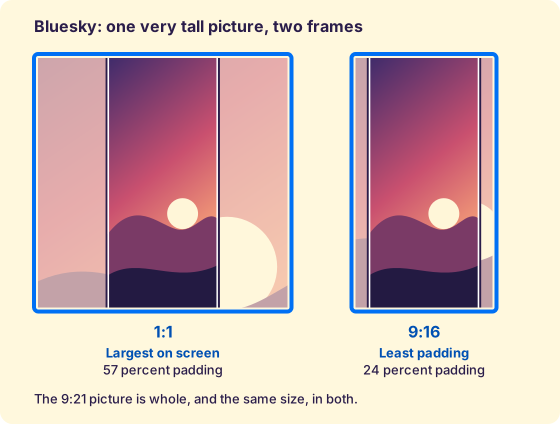
- Largest on screen: the biggest frame the app shows whole. Your picture fills it. If its aspect ratio is different, Pixino fills the extra space with a blurred copy of your picture by default, or with the color or gradient you choose. That extra space is called padding.
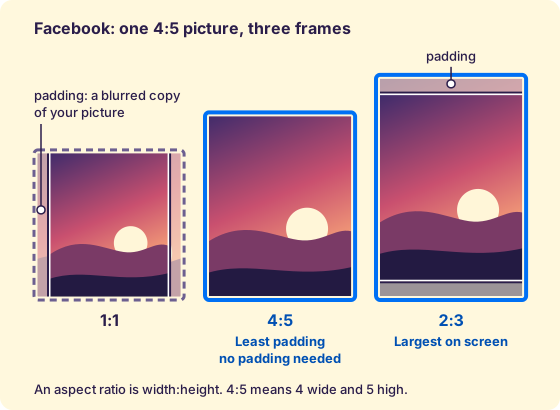
- Least padding: the frame closest to your picture's own aspect ratio, so the least extra space is added. If the app already shows your picture's own aspect ratio whole, that is the frame, and there is no padding.
Why use them
Some apps cut a picture that does not fit their frame, or shrink one that is larger than they keep, and you only see it after you post. Both suggestions are frames the app shows whole, so nothing is cut.
Largest on screen makes your picture as big on the screen as the app shows it whole. On the Facebook website, a 4:5 picture in the largest frame, 2:3, is drawn 20 percent taller than in a 4:5 frame, at the same width. Least padding keeps your picture closest to its own aspect ratio, with the least padding around it.
The two are often different frames. When both are the same frame, you see one.
Largest on screen is measured as the box the app draws on the screen, not as the pixels of your picture.
If you pick another aspect ratio by hand and the app would hide part of your picture, Pixino marks the part with a red cover labeled Clipped and says how much stays. The cover shows in the editor only and is never in the file you download.
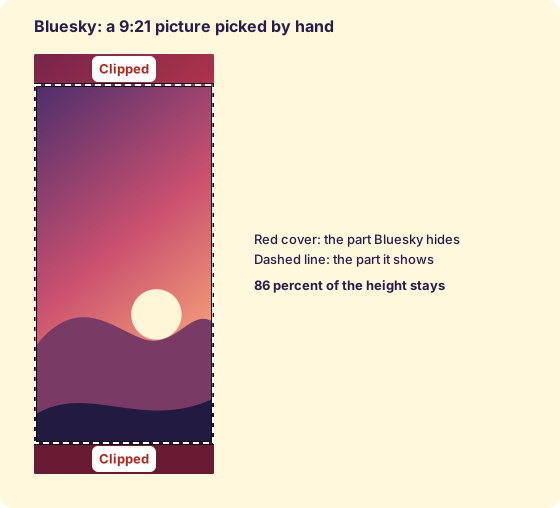
Pixino also makes the frame no larger than the largest size the app keeps. A larger picture would be shrunk by the app anyway, so you see the result before you post.
Measured apps
Bluesky
How we learned it. Measured on a computer on bsky.app, a single picture in a post. We read the frame on November 4, 2026 and posted the test pictures on November 3, 2026.
Cut off. Only the two tallest test pictures. Bluesky draws a picture in a frame no taller than twice its width (1:2). A 9:16 picture is shown whole. A 9:21 picture keeps 86 percent of its height and a 1:3 picture keeps 67 percent. Wide pictures, 4:1 included, are shown whole.
Size and file. Bluesky stored a 4:3 picture at 4000 by 3000 pixels, with a file just under 2 MB (1.98 MB, from 2.96 MB). A 1:2 picture was stored at 2000 by 4000. The change that raised Bluesky's picture limit from 1 MB to 2 MB was merged on April 8, 2026 (read November 4, 2026). We could not tell whether the file size or the pixels set the cap, because the web page took the picture by paste, and a paste may have re-encoded it.
Our reading, not tested. A tall infographic is the realistic case, because anything taller than 9:16 loses its first and last lines.
What Pixino suggests. Largest on screen is 1:1: a square was drawn 515 by 515 pixels, and a 4:5 picture was drawn 412 by 515. Least padding is your picture's own aspect ratio, held to 9:16 for a taller one, the tallest we posted whole. Pixino exports no larger than 4000 pixels on the long side and warns when the file is above 1.9 MB.
Not known. Whether a tap opens the whole picture of a cut one. The phone app.
Pages we read. The change that raised the picture limit to 2 MB.
Discord
How we learned it. Measured on a computer on discord.com, a file sent with Upload a File into a direct message, on November 3, 2026.
Cut off. None. All 13 test pictures were shown whole, and none was padded. The frame stops at 350 pixels tall, so a very tall picture is drawn narrow (a 1:3 picture was 117 wide and 350 tall).
Size and file. Discord keeps the file as sent: a 5120 by 5120 picture came back with the same bytes (4.36 MB). The chat shows a smaller copy, with the longest side at 640 pixels for a wide picture and 512 for a tall one, and keeps the original for the download. Discord's help page lists a 20 MB upload limit for free accounts, raised from 10 MB in August 2026 (read November 3, 2026). We found no size cap up to 5120 pixels, and tried nothing larger.
Our reading, not tested. A very tall picture is drawn narrow, so small text on it may be too small to read without opening the full-size view.
What Pixino suggests. Largest on screen is 1:1 (a square was drawn 338 by 338). Least padding is your picture's own aspect ratio, because nothing is cut. Pixino exports up to 5120 pixels on the long side for this post type.
Not known. The full-size view. A file over 20 MB.
Pages we read. File Attachments FAQ.
How we learned it. Measured on a computer on the Facebook website, a single photo post with the audience set to Only me, on November 3, 2026. The wide-picture size test was made on November 4, 2026.
Cut off. Tall pictures only, from the top and bottom, and always from the middle. Facebook draws a picture at its own width and never makes the frame taller than 2:3. A 2:3 picture is shown whole, exactly at the edge. A 9:16 picture keeps 84 percent of its height, a 9:21 picture keeps 64 percent and a 1:3 picture keeps 50 percent. Wide pictures, 4:1 included, are shown whole. A story preview, with nothing shared, kept about 87 percent of the width of a 9:16 picture and about half the width of a square (approximate, read from screenshots).
Size and file. A 4:3 picture and a 2:3 picture were both stored with the long side at 2048 pixels, and the file fell from 2.96 MB to 0.46 MB for the 4:3. The same 4:3 picture saved at a much lower JPG quality still came out at 2048, so the cap counts pixels. A very wide 4:1 picture kept 4096 on the long side. We did not find the rule behind the two limits. Facebook's help page about picture sizes would not open when we tried, so we have no published figure to compare.
Our reading, not tested. A tall infographic or flyer is the likeliest to suffer, because a headline set near the top or an address near the bottom can fall in the part that is cut.
What Pixino suggests. Largest on screen is 2:3, the tallest frame Facebook shows whole (636 by 955 pixels). Least padding is your picture's own aspect ratio, held to 2:3 for a taller one. Pixino exports no larger than 2048 pixels on the long side.
Not known. Posts with several photos, covers and the profile picture, and the phone app.
How we learned it. Measured on a computer on the Instagram website, a single photo post, on November 3, 2026. Instagram's crop step starts every picture on a square cut. The figures below are for the Original choice in that step, which is what you pick to keep your picture whole.
Cut off. Instagram's own help page says it accepts pictures from 1.91:1 to 3:4 and crops others to fit (read November 3, 2026). The test agrees. With Original, 1:1, 5:4, 4:3, 3:2, 16:9, 4:5 and 3:4 are shown whole. A 21:9 picture keeps 83 percent of its width and a 4:1 picture keeps 48 percent. A 2:3 picture keeps 90 percent of its height, a 9:16 picture 76 percent, a 9:21 picture 58 percent and a 1:3 picture 45 percent. Left on the square start, every picture except a square is cut: a 4:3 picture keeps 75 percent of its width and a 3:4 picture keeps 75 percent of its height. A carousel has one frame, set by the first picture, and every later slide is cut to it (crop step only, nothing posted).
Size and file. Instagram stored pictures up to 4096 pixels on the long side, and lowered the file by about a quarter (a 2.9 MB file became 2.17 MB). Instagram's help page says photos are uploaded at up to 1080 pixels wide, and larger ones are sized down to 1080. That page is written for the phone apps. Our test on the website read a larger stored copy, so the two disagree, and the feed or the profile grid may serve a smaller copy than the one we read.
Our reading, not tested. A tall flyer or poster is the likeliest to suffer, because a headline sits at the top and a date or address at the bottom, and a 9:16 picture loses about an eighth at each end even with Original.
What Pixino suggests. Largest on screen is 3:4: in the home feed, a 3:4 picture was drawn 468 by 624 pixels against 468 by 585 for a 4:5 one. Least padding is your picture's own aspect ratio, held between 1.91:1 and 3:4. Pixino reminds you to choose Original in Instagram's crop step, because any other choice cuts the picture again. It exports no larger than 4096 pixels on the long side.
Not known. Stories, because the website cannot make them. The phone app, which offers fewer crop options.
Pages we read. Image resolution of photos you share on Instagram, Crop your photo.
How we learned it. Measured on a computer on the LinkedIn website, a single photo post set to Anyone, on November 3, 2026.
Cut off. None. All 13 test pictures were shown whole, including 4:1. The frame follows the picture's aspect ratio up to a tall limit of 4:5, and a taller picture is padded at the sides. A 3:4 picture fills about 94 percent of the frame width, a 2:3 picture 83 percent, a 9:16 picture 70 percent, a 9:21 picture 54 percent and a 1:3 picture 42 percent (our calculation from the measured frame). LinkedIn's help page says pictures outside 3:1 to 4:5 are centered and cropped. Our test did not show that, and the page reads "Last updated: 2 years ago".
Size and file. LinkedIn served 800 pixels wide for both test posts, while other people's posts in the same feed were served 1280 wide, so larger copies exist. We never reached the largest one, so LinkedIn's stored size is not known. Its help page lists a 5 MB upload limit (read October 24, 2026) and recommends 1080 pixels wide.
Our reading, not tested. Nothing is hidden, so a headline survives, but a tall picture is drawn narrow, so small print on it may be hard to read.
What Pixino suggests. Largest on screen is 4:5 (384 by 480 pixels, the frame LinkedIn draws). Least padding is your picture's own aspect ratio. LinkedIn pads a picture taller than 4:5 at the sides itself. Pixino keeps today's template width of 1080 pixels as a ceiling, because LinkedIn's own size is not known.
Not known. LinkedIn's stored size. Posts with several photos, which LinkedIn's page says render at most 4:5. The phone app.
Pages we read. Share photos.
How we learned it. Measured on a computer on pinterest.com, a pin on a private board, read on the board grid, where each pin is about 237 pixels wide. We read the frame on November 4, 2026 and posted the test pictures on November 3, 2026.
Cut off. Pinterest shows pictures from 16:9 to 1:2 whole, and 2:3 and 9:16 were whole. A 21:9 picture keeps 76 percent of its width and a 4:1 picture keeps 44 percent. A 9:21 picture keeps 86 percent of its height and a 1:3 picture keeps 67 percent. Pinterest's help page says a pin taller than 2:3 "might get cut off", and the board grid was kinder than that.
Size and file. Pinterest kept pictures up to 4096 pixels on the long side, and lowered the file a lot (a 1.99 MB file became 0.65 MB). Its help page lists a 20 MB upload limit on the web (read November 3, 2026) and states no pixel size for pins.
Our reading, not tested. A wide banner with words along its length may lose its first and last letters, and a tall infographic may lose its top and bottom lines.
What Pixino suggests. Largest on screen is 1:2 (a 1:2 pin was drawn 275 by 550 pixels, whole). Least padding is your picture's own aspect ratio, held between 16:9 and 1:2. Pixino exports no larger than 4096 pixels on the long side, and warns when the file is above 20 MB.
Not known. The pin close-up and the home feed. The phone app.
Pages we read. Review Pin specs, Pinterest product specs.
Signal
How we learned it. Measured on a computer in the Signal desktop app, a photo sent to Note to Self, on November 3, 2026, with Sent media quality on High.
Cut off. Tall pictures only. Signal draws a picture 224 wide and no taller than 336 (2:3), in the app's own units. A 2:3 picture is shown whole. A 9:16 picture keeps 84 percent of its height, a 9:21 picture keeps 64 percent and a 1:3 picture keeps 50 percent. A tap opened the whole picture, which we checked on the 1:3 picture only.
Size and file. Signal stored pictures up to 3072 pixels on the long side, and lowered the file to about a third (2.57 MB became 0.82 MB). The account was already on High, so Standard quality is not measured. We found no official page about picture size.
Our reading, not tested. A 9:16 picture loses about 8 percent at each end, which may take a headline set close to the top or an address close to the bottom.
What Pixino suggests. Largest on screen is 2:3 (224 by 336). Least padding is your picture's own aspect ratio, held to 2:3 for a taller one. Pixino exports no larger than 3072 pixels on the long side.
Not known. Standard quality. Chats with other people, groups and a wider window. The phone apps.
Telegram
How we learned it. Measured on a computer on Telegram Web, a normal photo sent to Saved Messages, on November 3, 2026.
Cut off. None. All 13 test pictures were shown whole. The frame follows the picture's aspect ratio up to 432 pixels tall, and a picture too thin for a minimum width of 192 gets empty space at the sides (a sliver for 9:21, clear space for 1:3).
Size and file. Telegram gives you three choices, and we tested them on a square picture. A normal photo is stored with the long side at 1280 pixels (4.36 MB became 0.97 MB). Send In High Quality keeps 2560. Send as Files keeps the file untouched, 5120 pixels with identical bytes. Telegram's FAQ allows files of 2 GB and says nothing about compressing photos.
Our reading, not tested. Nothing is cut, but Telegram shows a smaller copy than the one you sent, so fine detail may soften.
What Pixino suggests. Largest on screen is 1:1 (432 by 432 pixels). Least padding is your picture's own aspect ratio, because nothing is cut. Pixino exports up to 5120 pixels on the long side, which is what Telegram keeps if you send the picture as a file.
Not known. High quality and as a file for pictures that are not square. Groups and the phone apps.
Pages we read. Telegram FAQ.
Threads
How we learned it. Measured on a computer on threads.com, a single photo post. We read the home feed on November 4, 2026 and the profile feed on November 3, 2026.
Cut off. None. All 13 test pictures were shown whole on the profile feed, with the frame never taller than 430 pixels. The home feed column is 322 wide, and a 9:16 picture was drawn 242 by 430, whole.
Size and file. Threads stored pictures up to 4096 pixels on the long side (a 3.18 MB file became 2.34 MB). A 4:3 picture came back with exactly the same byte count as on Instagram, which suggests the same Meta pipeline. That is our inference. Threads has no official help page about picture size that we found, and we did not read the account's Upload highest quality setting, so the result belongs to the setting as it was.
Our reading, not tested. A tall picture is drawn narrow, so small text on it may be hard to read.
What Pixino suggests. Largest on screen is 3:4 (322 by 430 pixels in the home feed). Least padding is your picture's own aspect ratio, because nothing is cut. Pixino exports no larger than 4096 pixels on the long side.
Not known. Whether a 3:4 frame is drawn exactly as the home feed shows it (we measured the 430 cap with a 9:16 picture). The phone app.
TikTok
How we learned it. Measured on a computer in TikTok Studio on the website, with photo posts set to Only you, on November 5, 2026. We made three posts of 13, 5 and 3 pictures and read each one in the viewer that opens for your own post.
Cut off. None in the viewer. All 13 test pictures, from 4:1 to 1:3, were shown whole in one fixed box of 605 by 667 pixels, and the box did not change with the first picture: a post that began with a 4:3 picture drew all five of its pictures whole in the same box. TikTok's own preview of the phone feed, on the upload page, drew a 9:16 first picture filling the screen and a 4:3 first picture whole with bars above and below. That preview is a drawing of a phone, not a phone, so it does not settle what a person sees. Studio's own post list is different: it shows each post as a 3:4 tile that cuts. By our calculation from the two aspect ratios, and not a reading of the profile grid, that tile keeps 75 percent of the width of a 1:1 picture, 42 percent of the width of a 16:9 picture and 75 percent of the height of a 9:16 picture.
Size and file. TikTok kept every picture at the size we uploaded it. Three pictures of 5120 pixels (9:16, 4:3 and 1:1) were kept at full size, and the two stored files we could open (9:16 and 1:1) were identical to the uploads byte for byte. We found no size cap up to 5120 pixels, and tried nothing larger.
Our reading, not tested. If the viewer is a fair guide, a picture of any aspect ratio from 4:1 to 1:3 reaches a viewer whole, so you do not need to cut it to fit. Whether the profile grid and the For You feed cut it as the post list does is not known. A tall flyer with a date at the bottom is the case to check first on a phone.
What Pixino suggests. One frame: Least padding, which is your picture's own aspect ratio, because nothing is cut in the viewer. There is no Largest on screen, because the viewer draws every picture in one fixed box and the phone frame was not measured. No red cover is shown. Pixino exports up to 5120 pixels on the long side, the largest size we tested.
Not known. The phone app, the For You feed, the profile grid in the app, ads, and sizes above 5120 pixels.
Pages we read. TikTok Support: photo posts.
How we learned it. Measured on a computer on WhatsApp Web, a normal photo sent to Message yourself, on November 3, 2026. WhatsApp Status was not measured: it was read from WhatsApp's help pages and one press report on November 5, 2026.
Cut off (chat photo). Tall pictures only. The chat frame is 240 wide and no taller than 338, about 5:7. A 4:5 and a 3:4 picture are shown whole. A 2:3 picture keeps 94 percent of its height, a 9:16 picture keeps 79 percent, a 9:21 picture keeps 60 percent and a 1:3 picture keeps 47 percent. The whole picture opened on a tap, which we checked on the 9:16 picture only.
Size and file. WhatsApp shrinks the file on upload. Standard stored 1600 pixels on the long side (2.81 MB became 0.48 MB), and with HD ticked it stored 2560. WhatsApp's help page says you can choose Standard or HD and gives no pixel sizes.
Our reading, not tested. A tall poster or flyer may lose its headline or its contact line, because a 9:16 picture loses about a tenth at each end and a 9:21 picture about a fifth.
What Pixino suggests (chat photo). Largest on screen is 1:1 (a square was drawn 330 by 330 pixels in the chat). Least padding is your picture's own aspect ratio, held to 5:7 for a taller one. Pixino exports no larger than 2560 pixels on the long side.
Status. WhatsApp publishes no aspect ratio, resolution or file size for a status picture. The sources agree on a full-screen vertical view where a picture of another shape sits whole, with empty space around it. WhatsApp says HD is not supported for statuses. Pixino treats 9:16 as the frame with the most room, which is an inference from one press report, and shows no red cover for it. Pixino keeps the long side of its old 1080 by 1920 template (1920 pixels) as a ceiling.
Not known. Whether HD keeps more than the 2560 we measured. Groups, photos sent as files and the phone apps. For Status: the stored size, the frame on a phone and what a viewer sees.
Pages we read. About HD photos and videos, How to create and share a status.
X
How we learned it. Measured on a computer on x.com, a single photo post, read on the timeline. We read the frame on November 4, 2026 and posted the test pictures on November 3, 2026.
Cut off. None. All 13 test pictures were shown whole, including 4:1 and 1:3. The frame is no taller than 510 pixels, so a very tall picture is drawn narrow (a 1:3 picture was 170 wide). X's own pages say photos from 2:1 to 3:4 are shown in full, and our test showed more than that.
Size and file. X stored pictures up to 4096 pixels on the long side (a 4.36 MB file became 2.46 MB). Its help page lists a 5 MB upload limit and says photos are scaled for display, and gives no pixel size.
Our reading, not tested. A tall picture is drawn narrow, so small text on it may be hard to read.
What Pixino suggests. Largest on screen is 1:1 (516 by 516 pixels). Least padding is your picture's own aspect ratio, because nothing is cut. Pixino exports no larger than 4096 pixels on the long side, and warns when the file is above 5 MB.
Not known. The phone app.
Pages we read. How to post photos or GIFs on X.
Measurements ongoing
Measurements for these 2 apps are ongoing. We have no figure yet for Snapchat and only a partial one for YouTube, and say so. Each section says where its facts come from.
Snapchat
How we learned it. We have no clipping test for Snapchat yet. What we read is from Snapchat's help pages, on November 3, 2026 and October 24, 2026.
What the pages say. Posting to your story from the web, Snapchat says its content has a 9:16 aspect ratio, so it crops a video automatically. The page covers video, and says nothing about photos. Snapchat's help page for single picture ads lists a 5 MB file limit and the file types .jpg or .png.
What Pixino suggests. Nothing measured yet, so no recommended aspect ratios and no red cover. Pixino has a fixed-size template for each kind of picture (for example Image Ad and Photo Snap, both 1080 by 1920 pixels). Choosing one sets the frame to that size and fits your picture inside it, centered and never enlarged.
Not known. Everything about how Snapchat draws a photo.
Pages we read. Post a Snap to My Story from the web, Top Snap specs.
YouTube
How we learned it. Measured on a computer, in part. We used YouTube Studio on the website, with one 4 second test video set to Private, on November 5, 2026. We read three pictures: 4:5, 4:1 and 2:3. After a run of uploads in a row a picture stopped registering, and we stopped there. We also read YouTube's help pages, on October 24, 2026 and November 5, 2026.
Cut off. None, in the three pictures we read. YouTube showed each whole inside a 16:9 frame and padded what did not fit. A 4:5 picture was padded at the sides and a 4:1 picture above and below. On the public copy of the 2:3 picture the sides were filled with a blurred, enlarged copy of the picture. For the 4:1 picture the bottom edge was not read cleanly, so "whole" rests on its size matching 4:1. We did not see YouTube cut a picture, and we did not try the pictures where it might (21:9 and 9:21).
What a Private video shows. While a video is Private, YouTube Studio served only a 320 by 180 copy of the thumbnail, so the 4:5 and 4:1 pictures were read on that small copy. The public copies were not available. For the 2:3 picture the video was set to Unlisted for one reading, so that the public copies could be read, and then back to Private.
Size and file. For the 2:3 picture (1000 by 1500 pixels, 147 KB uploaded) YouTube kept five public copies: 1280 by 720 pixels (75,874 bytes), 640 by 480 (42,772 bytes), 480 by 360 (14,335 bytes), 320 by 180 (7,928 bytes) and 120 by 90 (2,896 bytes). The largest copy was 1280 by 720, and the picture inside it was about 474 by 720 pixels, smaller than the file we uploaded. We did not upload the 5120 pixel pictures, so we do not know whether a larger upload gives a larger copy, or whether 1280 by 720 is where the public copy stops.
What the pages say. A custom 16:9 thumbnail on a vertical video is replaced on the home, explore and subscriptions pages by an automatic 4:5 thumbnail. YouTube's help page asks for 3840 by 2160 pixels for a 16:9 thumbnail and says custom thumbnails need a verified channel (read November 5, 2026). For a channel banner, the safe area for text and logos is 1235 by 338 pixels at the minimum banner size of 2048 by 1152, and larger pictures "get cropped on certain views and devices". The page lists a 6 MB limit for a banner and 15 MB for a profile picture.
What Pixino suggests. Not enough is measured yet: three aspect ratios are too few to name a limit, and the size above 1280 by 720 is not known. So there are no recommended aspect ratios and no red cover. Pixino has a fixed-size template for each kind of picture (for example Video Thumbnail, 1280 by 720 pixels). Choosing one sets the frame to that size and fits your picture inside it, centered and never enlarged.
Not known. Whether YouTube cuts a 16:9, 9:16, 4:3, 1:3 or 1:1 picture: we uploaded them but did not read them reliably. Whether it cuts a 5:4, 3:4, 3:2, 21:9 or 9:21 picture: we did not try them. What it does with the 5120 pixel pictures. How it draws the Shorts thumbnail, the community post picture, the channel banner preview, and the tiles on the home page and in search. Why a picture stopped registering after a run of uploads: the 1:1 picture did not register in three tries, and it may be a daily limit for channels that are not verified, which we did not confirm.
Pages we read. Custom thumbnails, Manage your channel branding.
Sources
Where this comes from
The measurements and the way we made them are in Pixino's research notes. Every figure on this page is either something we measured, or something an app's own help pages or a named press report say, and each section says which. We used no forums, no size guides from other sites and nothing from memory.